
mjEdit unterstützt den vollständigen OSCAL v1.2.2-Standard mit spezialisierten Editoren für jeden Dokumenttyp.
Alle 8 OSCAL-Dokumenttypen
| Dokumenttyp | Kürzel | Funktion | mjEdit-Feature |
|---|---|---|---|
| Katalog | catalog | Kontrollrahmenwerk definieren | Gruppen/Controls browsen, bearbeiten, erstellen |
| Profil | profile | Baseline-Auswahl treffen | Controls auswählen, Tailoring, Parameter setzen |
| System Security Plan | ssp | System dokumentieren | Komponenten, Inventar, Control-Implementierung |
| Assessment Plan | ap | Prüfung planen | Prüfmethoden, Scope, Zeitrahmen definieren |
| Assessment Results | ar | Ergebnisse dokumentieren | Findings, Observationen, Evidenz erfassen |
| Plan of Action & Milestones | poam | Maßnahmen verfolgen | Remediation-Items, Fristen, Status-Tracking |
| Component Definition | component | Bausteine definieren | Wiederverwendbare Komponentenbibliotheken |
| Mapping Collection | mapping | Frameworks mappen | Bidirektionale Control-Zuordnung zwischen Standards |
Das OOP-Prinzip: Komponenten als Klassen, Inventar als Instanzen
mjEdit bildet die OSCAL-Architektur intuitiv ab – angelehnt an objektorientierte Programmierung:
Komponente = Klasse (Blueprint)
"Apache HTTP Server" – Typ: Software, Beschreibung: Webserver
Inventar-Item = Instanz (konkretes Asset)
"Apache 2.4.58 auf Server web-01" – IP: 192.168.1.10, FQDN: web-01.example.com
Im SSP-Tab wird ein Inventar-Item-Dialog geöffnet, im Tab „Komponenten" werden die zugehörigen Software-/Hardware-Bausteine per Multi-Select verknüpft. mjEdit erzeugt automatisch die implemented-components-Referenz mit component-uuid.
Automatische OSCAL-Dokumentketten
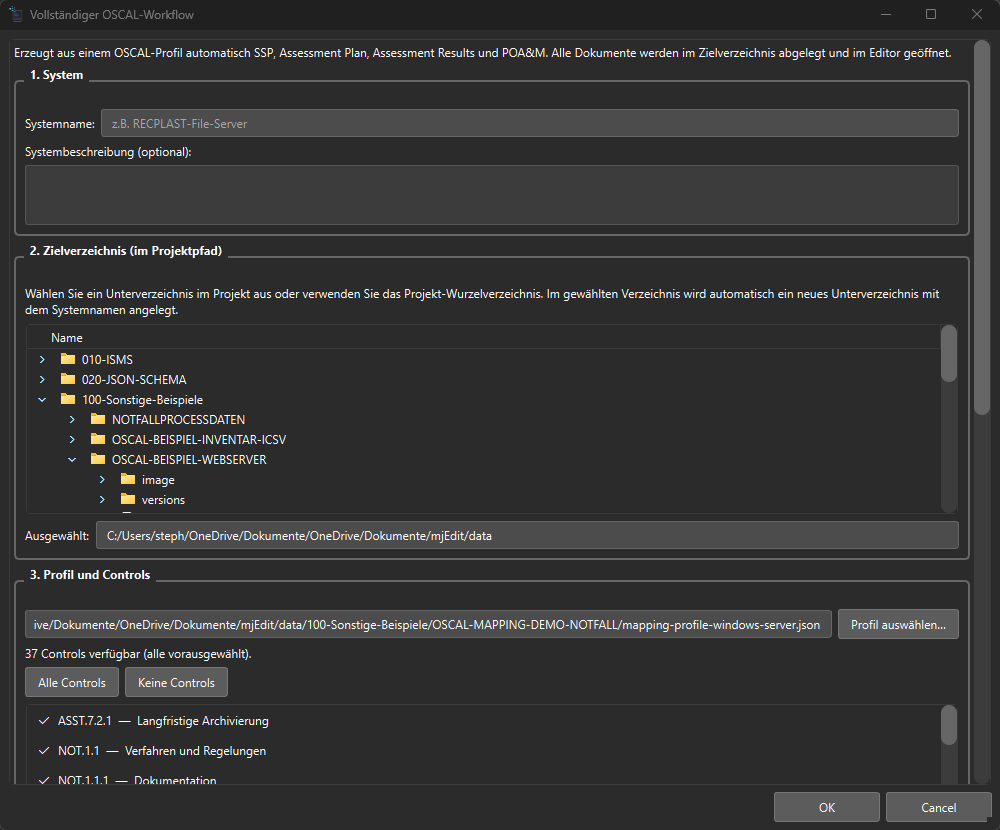
Sie müssen Dokumente nicht einzeln erstellen. mjEdit kann die gesamte Compliance-Kette automatisch generieren:
( Katalog (BSI/NIST) → Profil ) → System Security Plan → Assessment Plan → Assessment Results → POA&M
Jeder Schritt übernimmt UUID-Referenzen automatisch, setzt Metadata (Title, Version, last-modified) korrekt und validiert gegen das OSCAL v1.2.2 Schema.
Evidenz-Workflow mit Status-Tracking: SSP → AP → AR
Der Nachweis, dass ein geplanter Beleg tatsächlich geprüft wurde, ist der Kern jeder Auditierbarkeit – und der fehleranfälligste Punkt in der Praxis. mjEdit macht diesen Workflow explizit sichtbar: Drei prominente Tree-Knoten verbinden den System Security Plan, den Assessment Plan und die Assessment Results zu einer lückenlosen Evidenzkette.
Drei Dokumente – drei dedizierte Tree-Knoten
| Dokument | Tree-Knoten | Funktion |
|---|---|---|
| SSP | 📎 Evidenz-Verlinkungen (pro implemented-requirement) |
Welche Belege werden für diese Kontrolle gesammelt? |
| AP | 📎 Geplante Evidenzen |
Welche Belege müssen geprüft werden? (via validation-status-Property) |
| AR | 🧷 Aus AP zu prüfende Evidenzen (X/Y geprüft) |
Live-Status ✅ geprüft / ⏳ ausstehend pro Beleg |
Beim Öffnen eines Assessment-Results lädt mjEdit den verknüpften Assessment Plan automatisch über import-ap.href und gleicht die geplanten Evidenzen aus dem AP-back-matter gegen alle observation.relevant-evidence[].href-Anker im AR ab. Das Ergebnis ist sofort sichtbar: Wie viele der X geplanten Belege wurden bereits dokumentiert?
Ein-Klick-Observation für ausstehende Belege
Statt eine Observation manuell aufzubauen, genügt ein Rechtsklick auf einen ⏳-Knoten im AR-Tab:
„📋 Observation für diese Evidenz erstellen"
mjEdit erzeugt eine vollständige, OSCAL v1.2.2-konforme Observation – mit UUID, collected-Zeitstempel, methods: ["EXAMINE"] und dem schemakonformen Anker:
"relevant-evidence": [
  {
    "href": "#<uuid-der-ap-ressource>",
    "description": "Beleg aus AP-Planung"
  }
]
Optional setzt mjEdit props[name=evidence-source, value=ap] als Herkunftsmarkierung.
Warum ist das so wertvoll?
- Keine Lücken mehr: Das Audit-Team sieht sofort, welche der geplanten Belege noch nicht dokumentiert wurden – ohne manuelle Listen oder Tabellen.
- Automatische OSCAL-Konformität: Die generierten Observations folgen exakt dem NIST-OSCAL-v1.2.2-Schema –
relevant-evidence.hrefals#uuid-Anker ist schemakonform und werkzeugübergreifend verarbeitbar. - Complete traceability: The chain SSP (requirements) → AP (planning) → AR (evidence) can be derived directly from the file structure - without a proprietary database.
- Cross-Document-Linking: mjEdit automatically reloads the AP when opening the AR and shows the current test bench in real time.
Test scope: Assessment Subjects with include-all
In the assessment plan and the assessment results, OSCAL determines which assets will be examined - the so-called assessment subjects (examination objects). Each audit object has a type (component, location, inventory-item, user) and defines its scope via two complementary strategies:
| Strategy | OSCAL element | behavior |
|---|---|---|
| Include All | include-all: {} |
All assets of the selected type in the SSP are automatically included in the scope of inspection |
| Explicit Selection | include-subjects: [uuid, ...] |
Only the UUIDs listed by name are checked |
Regardless of the strategy chosen, individual UUIDs can be explicitly excluded using exclude-subjects (in the dialog: “Excluded subjects”).
What “Include All” does
If the option is active, mjEdit writes include-all: {} to the OSCAL file. This means:
- No manual follow-up: New components that are later created in the SSP are automatically included in the scope of testing - without opening the AP again.
- Targeted exceptions are still possible: Decommissioned systems or out-of-scope areas are removed from “Excluded Subjects” via UUID.
- Auditable: The decision “all except X” is explicitly documented in the OSCAL file – comprehensible for auditors and tools.
If the option not is active, include-subjects appears instead with the explicitly selected UUIDs - useful for targeted partial tests (e.g. only a specific subsystem or a single location).
Advantages according to OSCAL standard
- Scalability: For large infrastructures (100+ components),
include-allsaves you from manually listing each UUID - the scope automatically grows with the system. - Consistency: SSP and AP remain synchronous without follow-up maintenance. No risk of forgotten assets within the scope of the check.
- Cross-tool interoperability:
include-allis a standardized OSCAL v1.2.2 construct - any compliant tool (OSCAL CLI, IBM Trestle, custom pipelines) can correctly evaluate the scope. - Machine-readable exclusions: Instead of free text comments like “everyone except server X”, the file contains UUID references - validatable, versionable and auditable.
Batch generation for server landscapes via AI using the MCP protocol
oscal_generate_batch_tailored_chain is used for a server landscape - e.g. B. from 8 servers – a complete document chain is generated per system:
- 8 servers → 8 subdirectories (named after
system_id) - 6 OSCAL documents each: Profile → Component Definition → SSP → Assessment Plan → Assessment Results → POA&M
- = 48 validated documents in one call
Per server (target) you can, among other things: define: system ID, name, description, platform/OS, server-specific control selection (tailoring), protection level (sensitivity_level), roles, parties, component definition, assessment actions as well as inventory_items with host name, FQDN, IPv4/IPv6 and MAC addresses. Common fields (shared_roles, shared_parties, shared_sensitivity_level) apply to all systems and can be overwritten per target.
Three-level schema validation
| level | Mechanism | Timing |
|---|---|---|
| 1. Pydantic models | Python based data validation | When creating and editing |
| 2. JSON Schema | NIST OSCAL v1.2.2 Schemas | On request or before saving |
| 3. Reference integrity | UUID/Href/Control-ID check | When prompted for validation |
Automatic OSCAL document healing
OSCAL documents today arise from many sources: NIST examples, BSI converters, AI pipelines, legacy generators, or manual editing in any JSON editor. In practice, the result is schematic or outdated structures - e.g. E.g. forbidden fields like description at statement level in the SSP, missing mandatory fields like import-ap in the assessment result, datetime values without a time zone suffix or NIST Pre-1.2.2 containers like system-interconnections.mjEdit solves this problem with a document type-specific, idempotent healing logic that is called automatically when opening and saving:
| Document type | Healing (excerpt) |
|---|---|
| SSP | Repair system-ids, responsible-parties, by-components · Statement-description → by-components[this-system].description · system-interconnections → components[type=interconnection] · import-component-definitions → back-matter.resources · remove forbidden top levels |
| Assessment Results | Mandatory field Add import-ap · Add assessment-platforms · Force time zone suffix for start/end |
| POA&M | Legacy-remarks → props[name=legacy-remarks] (lossless) |
| Component definition | Detection and conversion of older structural formats |
| Mapping Collection | NIST-compliant customizations for provenance and map-entry before schema validation |
Why is this important?
- Lossless: Content is migrated, not deleted. Text from forbidden fields moves into semantically appropriate target structures.
- Idempotent: Opening and saving multiple times produces identical results.
- Consistent validation: Since healing runs on both open and save (and before any manual validation), the validator sees exactly what is later in the file.
- Statistics in the log: Each save operation logs how many fields were migrated (e.g.
statement_descriptions_migrated: 3,legacy_system_interconnections_migrated: 2). - Round trip capable: Migrated content will appear in the appropriate dialog the next time it is opened.
Recommendation for “inherited” OSCAL files: An OSCAL document from a third-party tool or an old inventory does not have to be laboriously schema-fixed manually. Open once in mjEdit, save once - done. The next time the schema is run it will be OSCAL v1.2.2 compliant.
Pre-installed compliance frameworks
- BSI IT-Grundschutz++ (2,128 controls)
- NIST SP 800-53 (468 controls)
- BSI criteria catalog C5 according to Christop Puppe (still in progress)
- BSI criteria catalog 200-x compendium 2023 according to Christop Puppe (still in progress)
Mapping Collection — Offline AI powered
The Mapping Tab is one of the outstanding unique selling points of mjEdit: Controls from two OSCAL documents (Source ↔ Target) are systematically mapped to one another - e.g. B. NIST SP 800-53 ↔ BSI IT-Grundschutz, C5 ↔ ISO 27001 or BSI 200-x Compendium 2023 ↔ BSI IT-Grundschutz++.
Why is this so valuable?
Manual mapping between two extensive control catalogs is one of the most time-consuming and error-prone tasks in compliance work:
- A complete mapping between e.g. B. NIST SP 800-53 (468 controls) and BSI IT-Grundschutz++ (2,128 controls) means in the worst case almost a million pair comparisons - reading, understanding, evaluating, documenting each comparison.
- Without tools, you can expect several person weeks to months per mapping project; With mjEdit + AI suggestions, the effort is reduced to a few days - the person only evaluates the AI suggestions instead of reinventing the wheel.
- The result is machine-readable (OSCAL JSON), schema-validated, versionable and reusable for years - no more Excel graveyard.
How does AI work – and what does “offline” mean?
The AI functions run fully locally in mjEdit. An open-source, multilingual Sentence Transformer model (paraphrase-multilingual-MiniLM-L12-v2) is used, which is loaded once onto the computer the first time it is called and then used offline.
Data protection first: No control text, no catalog and no mapping suggestion ever leaves the computer. No cloud, no API key, no token costs - so it can also be used for highly regulated areas (BSI, authorities, KRITIS).
Auto-suggest with four methods
mjEdit offers a button “Generate suggestions” in the mapping editor. The method can be set per run:
| Method | Procedure | When to use? || ———— | ——————————————————————————— | —————————————————————————– |
| syntactic | String-/Text-Ähnlichkeit (SequenceMatcher über normalisierte Titel + Statements) | Sehr ähnliche Frameworks, identische Sprache, bekannte Wortwahl |
| semantic | Vergleich mehrsprachiger Vektor-Embeddings (Bedeutungs-Ähnlichkeit) | Unterschiedliche Wortwahl, unterschiedliche Sprachen (DE/EN/FR/IT) |
| functional | Funktionale Ähnlichkeit (Wirkungsabsicht eines Controls, nicht die Formulierung) | Strukturell sehr verschiedene Frameworks (z. B. NIST → BSI) |
| auto | Kaskade Semantic → Functional → Syntactic, bis ein Treffer über Schwelle liegt | Standard für die meisten Projekte – holt aus jedem Pärchen das Beste |
Zusätzlich:
- Auto-Akzeptanz-Toggle: Vorschläge oberhalb der konfigurierbaren Schwelle (Standard 0,4) werden direkt übernommen – die Person prüft nur noch Grenzfälle.
- Sprachübergreifend: Source auf Deutsch, Target auf Englisch? Das Embedding-Modell beherrscht Cross-Language-Semantik nativ.
- Bulk-Operationen, Schema-Validierung, Markdown-Export für Reviews und Reports.
Beispiele für Mapping-Treffer
| Source (NIST SP 800-53) | Target (BSI IT-Grundschutz) | Methode | Score |
|---|---|---|---|
| AC-2 Account Management | ORP.4.A1 Regelung für Benutzerkonten | semantic |
0,82 |
| IA-2 Identification and Authentication (Org. Users) | ORP.4.A8 Regelung des Passwortgebrauchs | functional |
0,71 |
| AU-2 Event Logging | OPS.1.1.5.A1 Protokollierung | syntactic |
0,68 |
| SC-7 Boundary Protection | NET.1.1.A2 Sicherheits-Gateway (Firewall) | semantic |
0,74 |
Konkreter Use Case: BSI 200-x Kompendium 2023 → BSI IT-Grundschutz++
Aufgabenstellung: „Wie können die Inhalte des bestehenden BSI-IT-Grundschutz-Kompendiums 2023 für den neuen Grundschutz++ einfließen? Welche Inhalte welcher Bausteine sollten in welche Praktiken vom Grundschutz++ übernommen werden – und wo entstehen Lücken?"
Mit mjEdit lässt sich diese Frage in einem klar strukturierten 9-Schritt-Prozess beantworten:
1. Aufgabenstellung präzisieren
Source = BSI 200-x Kompendium 2023 (Bausteine), Target = BSI IT-Grundschutz++ (Praktiken). Geltungsbereich (z. B. nur die Bausteine ORP.* und OPS.*), Schutzbedarfsklassen und Sprachausrichtung festlegen.
2. Source-Katalog zuschneiden
Das vollständige Kompendium 2023 wird in mjEdit als OSCAL-Katalog geöffnet. Über den Katalog-Editor werden Bereiche, die nicht in den Vergleich einfließen sollen (z. B. veraltete Bausteine), markiert.
3. Source-Profil erstellen → resolven → zugeschnittenen Katalog ableiten
- Im Profil-Editor wird ein Source-Profil erstellt:
include-controlsfür die relevanten Bausteine,add-Modifikationen für Anmerkungen/Ergänzungen aus der eigenen Organisation. - Per Profile-Resolution entsteht ein aufgelöstes Profil (alle Vererbungen, Tailoring-Regeln und Modifikationen sind ausgewertet).
- Daraus wird mit einem Klick ein zugeschnittener Source-Katalog als eigenständige
catalog.jsonexportiert – die saubere Vergleichs-Basis für das Mapping.
4. Target-Katalog zuschneiden
Analog wird der Grundschutz++ Katalog (2.128 Controls) geöffnet und auf den relevanten Praktik-Umfang gefiltert (z. B. nur die Praktiken passend zum Geltungsbereich aus Schritt 1).
5. Target-Profil erstellen → resolven → zugeschnittenen Katalog ableiten
Wie Schritt 3, nur für das Target. Das aufgelöste Target-Profil sorgt dafür, dass Anmerkungen, organisationsspezifische Parameter und Ergänzungen sauber im zugeschnittenen Target-Katalog landen.
6. Mapping-Datei erstellen
Datei → Neu → OSCAL Mapping Collection. Die leere Mapping-Collection bekommt zwei resource-Einträge mit relativen href-Pfaden zu den beiden zugeschnittenen Katalogen aus Schritt 3 und 5.
7. Source- und Target-Katalog im Mapping-Tab auswählen
Both catalogs are loaded in the mapping tab. mjEdit shows the source controls on the left, the target controls on the right, and the mapping table in the middle with columns for method, reason (matching-rationale), relationship (equivalent, subset-of, superset-of, intersects-with) and statement preview.
8. Automatic mapping
Select method auto, threshold e.g. E.g. set to 0.5, press “Generate suggestions”. mjEdit runs through the cascade Semantic → Functional → Syntactic for each source control and writes the best hit for each pair, including the score and method, into the table. With auto-acceptance activated, hits above threshold go directly to the mapping collection; everything below ends up in the review column.
At e.g. B. 250 source × 350 target controls, 87,500 pair evaluations are completed in a few minutes - an effort that would not be possible manually.
9. Use result – generate reports & follow-up artifacts
The following can be derived automatically from the finished mapping collection with a click:
- Resolved Profile (tailoring based on mapping)
- SSP proposal (System Security Plan with adopted implementations)
- Cross-Reference Report (Markdown/CSV: which source control covers which target control)
- Gap analysis (which target practices are not covered by any source → action required)
- Component definition stub (reusable component with mapping references)
- POA&M-Stub (an entry with suggested measures for each gap)
What benefits do the individual roles derive from the mapping?
| role | Insights from mapping |
|---|---|
| CISO / Compliance Manager | How many controls are already covered by the existing framework? Where are the biggest gaps? |
| ISMS responsible person | Which practices from Grundschutz++ require re-implementation, which are “just” re-mapping? |
| Auditor | Comprehensible, schema-validated justification for each mapping (matching-rationale + score) instead of gut feeling. |
| Architect | Component definition stub as a technical template for tools, platforms, cloud services. |
| Project Manager Migration | Gap analysis + POA&M show the effort, sequence and prioritization of the migration steps. |
| Data protection officer | Local processing – sensitive compliance content remains on-premise. |
In short: a manual Excel spreadsheet lasting several months becomes a reproducible, AI-supported, schema-validated workflow of just a few days - with testable follow-up artifacts for the entire compliance chain.