
mjEdit organizes work in a multi-tab system. Each tab is specialized for a specific workspace and works seamlessly with the others.
Text Tab — The JSON editor
The heart of mjEdit: a full-fledged JSON editor with syntax highlighting, real-time validation, bracket matching and intelligent auto-repair.
Performance modes for large files
| File size | behavior |
|---|---|
| < 100KB | Full highlighting + spell check + all features |
| 100KB – 200KB | Simplified highlighting (keys/brackets only), no spell check |
| > 1MB | No highlighting, lazy loading (first 10,000 lines) |
Form Tab — qFORM form system & QC scripts
The Form tab automatically turns JSON data into editable forms. The proprietary qFORM format combines structured data entry with embedded Python scripts (QC scripts) in a RestrictedPython sandbox.
Automatic widget detection
| Field type | Widget | JSON detection |
|---|---|---|
| Nested Object | QGroupBox | Value is {} (Dict) |
| Array/List | QGroupBox (orange) | Value is [] (Array) |
| QC script | QTextEdit (readonly) | Value starts with "QC", >10 characters |
| Checkbox | QCheckBox | Value is true or false |
| Dropdown | QComboBox | Value starts with |, ≥2 pipes |
| File path | QLineEdit + 📁 | Value contains path pattern |
| Date | QLineEdit + DATE | Date keyword in key or date format |
| Text (default) | AutoResizeTextEdit | Everything else |
QC script syntax coming soon
QC scripts are embedded in string fields of the qFORM file, compiled into a RestrictedPython sandbox and executed on rendering. The final expression result replaces the code block in the form.
| Element | Meaning |
|---|---|
@( … )@ |
Marks a QC code block (also allowed multiple times in the same field) |
<feldname> |
Placeholder – replaced by the value of a qFORM field before execution (dot notation possible for nested paths) |
json_data |
The entire qFORM file as a dict – e.g. B. if an OSCAL file is opened directly in the Form tab |
| Allowed modules | datetime, json, math, re, time, socket, urllib, optional requests (no direct file access) |
Example 1 — Beginners: Pick-up date for a new passport
An authority qFORM records the day of the application and automatically calculates the earliest collection date (classic: application date + 30 days).
{
  "Reisepass-Antrag": {
    "antragsdatum": "DATUM 06.05.2026",
    "bearbeitungsdauer_tage": 30,
    "abholtermin": "QC: berechneter Termin: @(\nfrom datetime import datetime, timedelta\nantrag = datetime.strptime('<antragsdatum>', '%d.%m.%Y')\nabholung = antrag + timedelta(days=int('<bearbeitungsdauer_tage>'))\nf'{abholung.strftime(\"%A, %d.%m.%Y\")} (frühestens)'\n)@"
  }
}
This is how the QC field is rendered, for example: B. as:
berechneter Termin: Freitag, 05.06.2026 (frühestens)
What’s happening here?
<antragsdatum>and<bearbeitungsdauer_tage>are replaced with the current field values before execution.datetimeis available in the sandbox, the code calculatesAntragstag + 30 Tage.- The final expression (
f"…") becomes the result - no more boilerplate is necessary. - As soon as the clerk changes
antragsdatum, mjEdit automatically updates the display.
Example 2 — Advanced: Count SSP implementation status
A pure OSCAL SSP file contains no QC field. However, there is the possibility of evaluating data via a temporary QC field and combining OSCAL files with qFORM in a meaningful way - either directly in the form tab or via an independent qFORM with a file picker (see below):
Variant A — Open SSP directly in the form tab
When you open an OSCAL SSP JSON in mjEdit and view it in the Form tab, the SSP itself is json_data. A QC block temporarily inserted in a free description field can evaluate the entire document - useful for sample statistics during a review:
@(
reqs = json_data.get('system-security-plan', {}).get('control-implementation', {}).get('implemented-requirements', [])
implementiert = sum(
    1 for r in reqs
    for s in r.get('statements', [])
    for bc in s.get('by-components', [])
    if bc.get('implementation-status', {}).get('state') == 'implemented'
)
total = len(reqs)
f"Implementiert: {implementiert} von {total} Anforderungen ({(implementiert/total*100 if total else 0):.1f} %)"
)@
Advantage: No additional tooling, can be used immediately. Disadvantage: The QC block must be removed before saving if the document is to remain schema valid.#### Variant B — Own “SSP statistics” qFORM with file picker
The clean version is an independent qFORM that records a file path to an SSP file and reads it in via urllib. The file path widget (📁 button) is natively supported by qFORM; the QC script accesses the value via <ssp_pfad>:
{
  "SSP-Statistik": {
    "ssp_pfad": "C:/oscal/ssp_acme.json",
    "report": "QC-Bericht: @(\nimport urllib.request, json\nfrom urllib.parse import urljoin\nfrom pathlib import PurePath\nuri = 'file:///' + str(PurePath('<ssp_pfad>')).replace('\\\\','/')\nwith urllib.request.urlopen(uri) as f:\n    ssp = json.load(f)\nreqs = ssp.get('system-security-plan', {}).get('control-implementation', {}).get('implemented-requirements', [])\nimpl = sum(1 for r in reqs for s in r.get('statements', []) for bc in s.get('by-components', []) if bc.get('implementation-status', {}).get('state') == 'implemented')\nf'{impl} von {len(reqs)} Controls implementiert'\n)@"
  }
}
Steps for the user:
- Open SSP statistics qFORM.
- Select the SSP file using the 📁 symbol.
- mjEdit replaces
<ssp_pfad>with the selected path and executes the QC script. - The result appears live in the form - every path change triggers a recalculation.
Advantage: Reusable, the SSP file itself remains unchanged, the QC script can deliver any complex evaluations (traffic lights per control family, missing components, POA&M references, etc.).
Markdown tab — Documentation and reports
Full-fledged Markdown editor with live preview in split view, GitHub Flavored Markdown, auto-formatting via mdformat and PDF/HTML export.
Advanced task list system
| Element | Syntax | Example |
|---|---|---|
| Checkbox | - [ ] / - [x] |
- [x] Server konfiguriert |
| Priority | Keywords | kritisch, wichtig, hoch |
| Status | Keywords | in arbeit, pausiert, vollständig |
| Assignment | @Person |
@Mueller |
| Date | 📅 YYYY-MM-DD |
📅 2026-04-30 |
| Tags | #Tag |
#sicherheit #patch |
| OSCAL links | &OSCAL|...|... |
Direct link to OSCAL Controls |
| POA&M References | &POAM|...|... |
Direct link to measures |
PDF Tab — Viewer, Annotator and Redaction Tool
PDF documents are displayed directly in mjEdit - with multi-tab support, annotations, text search and secure redaction.
- Zoom 25% – 400%, Fit to Width / Fit to Height
- Highlighter, notes, freehand drawing, shapes, text insertion
- Secure redaction with Unicode block (■): Content is actually removed, not just covered over
- Save PDF with all annotations as a new file
Browser tab — Built-in web browser
Full-fledged Chromium-based browser directly in mjEdit - with a two-tier bookmark system.
Global vs. private bookmarks
| Property | Global Bookmarks | Private Bookmarks |
|---|---|---|
| Purpose | Team resources, shared references | Personal Collection |
| Location | data/global-browser-bookmarks/ |
config/ |
| Add | Dialogue with title, tags, abbreviations | One click – no dialogue |
| Team sharing | Shareable via Git | Local only |
Save web pages as an OSCAL back matter resource
Any web page displayed can be inserted into an open OSCAL document as a back matter resource by right-clicking - one click instead of copy-pasting between applications.
OSCAL Tabs (Plugin) — Specialized editors
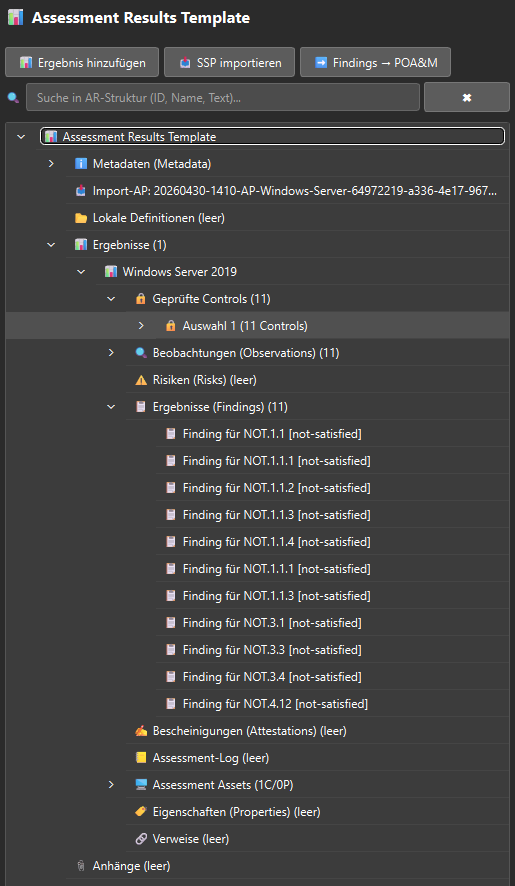
The OSCAL tabs open automatically when mjEdit detects an OSCAL file. A tailor-made editor is available for each of the 8 OSCAL document types - see OSCAL integration.
File Tree View — Central Cockpit
- Lazy loading for large directories (1,000+ files)
- Colored file icons per extension (configurable)
- Real-time filter, case-insensitive and recursive
- Context menu with actions depending on file type
- Backup indicator shows existing backups
- Multi-selection for batch operations
- “Open as text” bypasses automatic OSCAL routing
Backup and versioning concept
mjEdit offers a two-tier safety net:
- Automatic backups – compressed (GZIP), time-based, on open and save
- Version Archive - named snapshots with diff display and preview
A backup of the current file is automatically created before each restore.